Teach your AI agent to make PDFs
Your agent just wrote a report in Markdown. Now somebody has to turn it into a document a client can open. Here is how to make that the agent's job too — a small skill, one API call, no local rendering toolchain.
Coding agents produce Markdown all day: release notes, audit reports, migration plans, meeting summaries. Markdown is the right format to write and the wrong one to hand over — the person on the other end wants a PDF with page numbers, not a text file full of hash signs.
The usual fix is to install a rendering toolchain on the machine the agent runs on: pandoc, LaTeX, a headless Chromium. That is a large dependency, it differs per OS, and it breaks quietly. The alternative is one HTTP call to a service that already has the toolchain, and a small wrapper that teaches the agent when to make it.
Below is that wrapper, built for Claude Code skills. The same script works from any agent, editor or CI job that can run a shell command — see the last section.
What a skill is
A skill is a folder with a Markdown file that tells the agent when to do something and how. The agent reads the description, matches it against what the user asked, and follows the instructions. No plugin API, no build step — a folder and a file:
~/.claude/skills/markdown-to-pdf/
├── SKILL.md      # when to use this + how to run it
└── md2pdf.py     # the actual work
The important part is the description in the front matter.
That is the only thing the agent sees before deciding whether the skill
applies, so it has to contain the phrasings a real person would use —
including in the languages your team actually speaks.
Step 1 — get an API key
The free tier includes API access; no card.
- Create an account.
- Open cabinet → API tokens and issue one.
- Copy it immediately — the plaintext key is shown once. After that only its fingerprint is stored, so a lost key is replaced, not recovered.
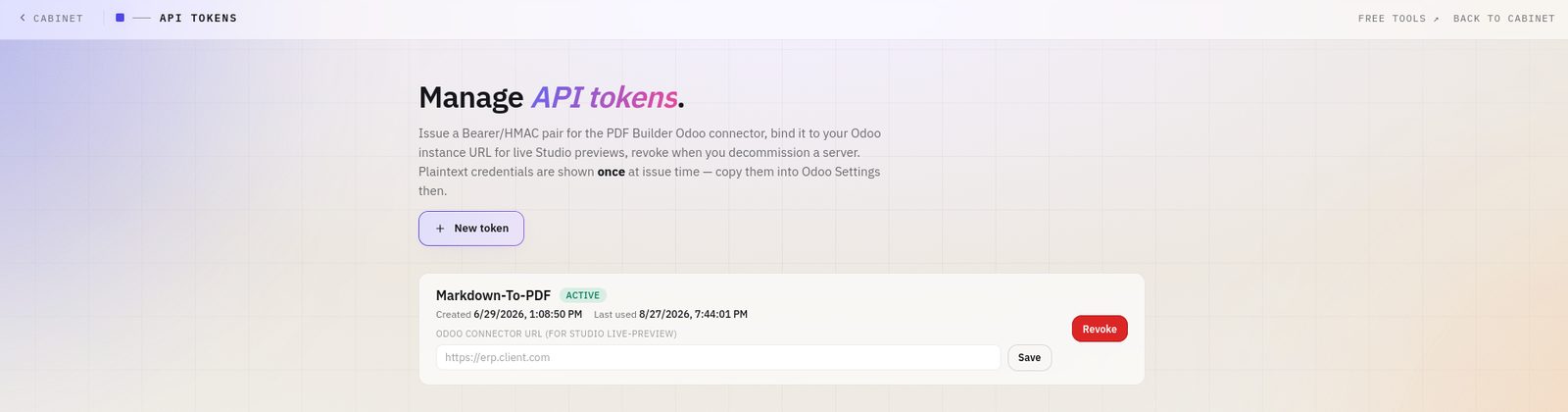
Put it in your shell profile, never in the script:
export ERP2PDF_API_KEY="pk_live_…"Do not bake the key into the file. A skill folder is the kind of thing that gets copied to a teammate, committed to a dotfiles repo, or pasted into a chat — all of which turn a hardcoded key into a published one. Read it from the environment and fail loudly when it is missing.
Step 2 — the script
Save as ~/.claude/skills/markdown-to-pdf/md2pdf.py:
#!/usr/bin/env python3
"""Convert a Markdown file to PDF via the erp2pdf.com API."""
import argparse, json, os, re, subprocess, sys, tempfile, time

API_URL = "https://erp2pdf.com/api/v1/markdown-to-pdf"
# A browser-ish UA: the API sits behind a WAF that is suspicious of
# default client signatures. See "Two failures" below.
USER_AGENT = ("Mozilla/5.0 (X11; Linux x86_64) AppleWebKit/537.36 "
              "(KHTML, like Gecko) Chrome/124.0 Safari/537.36")


def first_h1(md):
    for line in md.splitlines():
        m = re.match(r"^#\s+(.+)$", line.strip())
        if m:
            return m.group(1).strip()
    return None


def post(payload, token, out_path):
    """Send via curl and return the HTTP status code."""
    with tempfile.NamedTemporaryFile("wb", suffix=".json", delete=False) as f:
        f.write(payload)
        body_path = f.name
    try:
        proc = subprocess.run(
            ["curl", "-sS", "-X", "POST", API_URL,
             "-H", f"Authorization: Bearer {token}",
             "-H", "Content-Type: application/json",
             "-H", f"User-Agent: {USER_AGENT}",
             "--data-binary", f"@{body_path}",
             "--output", out_path,
             "-w", "%{http_code}"],
            capture_output=True, text=True, timeout=180)
    finally:
        os.unlink(body_path)
    if proc.returncode != 0:
        raise RuntimeError(f"curl failed: {proc.stderr.strip()}")
    code = (proc.stdout or "").strip()
    return int(code) if code.isdigit() else 0


def main():
    ap = argparse.ArgumentParser(description="Markdown -> PDF via erp2pdf.com")
    ap.add_argument("input")
    ap.add_argument("output", nargs="?")
    ap.add_argument("--page-size", default="a4",
                    choices=["a4", "letter", "a5", "legal"])
    ap.add_argument("--title", default=None)
    args = ap.parse_args()

    token = os.environ.get("ERP2PDF_API_KEY")
    if not token:
        print("error: ERP2PDF_API_KEY is not set. Issue a key at "
              "https://erp2pdf.com/cabinet-tokens", file=sys.stderr)
        return 2

    if not os.path.isfile(args.input):
        print(f"error: no such file: {args.input}", file=sys.stderr)
        return 1

    with open(args.input, encoding="utf-8") as fh:
        markdown = fh.read()

    output = args.output or os.path.splitext(args.input)[0] + ".pdf"
    title = args.title or first_h1(markdown) or os.path.basename(args.input)
    payload = json.dumps({
        "markdown": markdown,
        "page_size": args.page_size,
        "title": title,
        "file_name": os.path.basename(output),
    }).encode("utf-8")

    code = post(payload, token, output)
    if code == 429:
        print("rate limited; waiting 61s and retrying once…", file=sys.stderr)
        time.sleep(61)
        code = post(payload, token, output)

    if code != 200:
        detail = ""
        if os.path.isfile(output):
            with open(output, "rb") as fh:
                detail = fh.read()[:500].decode("utf-8", "replace")
            os.unlink(output)
        print(f"error: HTTP {code}\n{detail}", file=sys.stderr)
        return 1

    # The body of a failed request can still be 200-shaped; check the magic
    # bytes before telling the agent it succeeded.
    with open(output, "rb") as fh:
        if fh.read(4) != b"%PDF":
            print("error: response is not a PDF", file=sys.stderr)
            return 1

    print(output)
    return 0


if __name__ == "__main__":
    sys.exit(main())
Roughly a hundred lines, and most of them are error handling. That ratio is not an accident: an agent cannot see your terminal, so the only way it learns that something went wrong is a non-zero exit code and a message it can read.
Step 3 — SKILL.md
Save next to the script as SKILL.md:
---
name: markdown-to-pdf
description: >-
  Convert a Markdown file to a ready, branded PDF via the erp2pdf.com API.
  Use whenever the user asks to generate/make/export a PDF from a markdown
  file, or says "markdown to PDF", "md to pdf", "make a PDF",
  "сделай PDF из этого .md". The API returns a finished, verified PDF
  (footer + page numbers); just save it.
---

# Markdown → PDF (erp2pdf.com)

Convert a `.md` file to PDF through the erp2pdf.com REST API. No local
rendering toolchain (pandoc/Chromium) is needed.

## How to run

```bash
python3 ~/.claude/skills/markdown-to-pdf/md2pdf.py <input.md> [output.pdf] \
  [--page-size a4|letter|a5|legal] [--title "Document title"]
```

- `output.pdf` defaults to the input path with a `.pdf` extension.
- `--title` defaults to the first `# H1`, then the filename.
- Prints the output path on success; exits non-zero with a message on failure.

## Token

Reads `$ERP2PDF_API_KEY`. Issue one at https://erp2pdf.com/cabinet-tokens.

## Rate limit

**1 PDF per minute** per account. On HTTP 429 the script waits the
`Retry-After` interval and retries once. Convert several files one at a
time with a pause — parallel calls will 429.
Two details in that description do real work. The phrasings — including Russian ones — are what the agent matches against; a description that only says "converts Markdown" will not fire when someone says "сделай PDF". And the last line of the front matter tells the agent the output is final, so it does not try to "improve" a finished PDF by re-rendering it.
Step 4 — try it
Ask the agent in plain language:
> make a PDF out of docs/release-notes.mdIt matches the description, runs the script, and hands back
docs/release-notes.pdf. No mention of the skill, the API or
the key — which is the point.
Check the script by itself first, so a failure is unambiguous:
python3 ~/.claude/skills/markdown-to-pdf/md2pdf.py README.md /tmp/out.pdf
# → /tmp/out.pdf
Two failures that cost the most time
1. Python's HTTP client gets a 403, curl does not
The obvious implementation uses urllib or
requests. Against an API behind a WAF, that can come back
403 with a challenge page — in our case Cloudflare error
1010, which rejects the client's TLS and User-Agent signature before the
request ever reaches the application. The key is fine, the payload is
fine, and the response body is HTML.
That is why the script shells out to curl with a browser
User-Agent. It looks like a workaround because it is one, and it is worth
the two extra lines: the alternative is an agent that reports "the API
rejected my key" when the key was never seen.
2. A 200 that is not a PDF
Always check the magic bytes. A proxy error page, an HTML challenge or a
JSON error can arrive with a success-shaped status, and writing it to
report.pdf produces a file that fails to open hours later,
far from the cause. Four bytes — %PDF — turn that into an
immediate, obvious failure.
The same thing without an agent
Everything above is one REST call, so it fits anywhere a shell command does — a Makefile target, a CI job that attaches a rendered changelog to a release, a git hook, a cron that mails a weekly report:
curl -X POST https://erp2pdf.com/api/v1/markdown-to-pdf \
  -H "Authorization: Bearer $ERP2PDF_API_KEY" \
  -H "Content-Type: application/json" \
  -d '{"markdown":"# Release 2.4\n\nShipped today.","page_size":"a4"}' \
  --output release.pdf
Three endpoints exist —
/api/v1/markdown-to-pdf,
/api/v1/html-to-pdf and
/api/v1/url-to-pdf — each returning
application/pdf directly, with no job to poll. Full schemas
and a live console are in the API docs.
Other agents and editors
The script is the portable part; only the wrapper differs:
| Tool | How it hooks in |
|---|---|
| Claude Code | SKILL.md as above, in ~/.claude/skills/ |
| Cursor / Windsurf | A project rule that documents the command, plus the script in the repo |
| Custom agent (tool calling) | Expose the script as a tool: one string argument (path), returns the output path |
| CI (GitHub Actions, GitLab) | Run the curl call directly; put the key in the secret store |
| Makefile / npm script | make pdf FILE=docs/report.md |
In every case, the key comes from the environment and the failure mode is a non-zero exit with a readable message.
No key, no setup
If you only need a PDF now and none of this automation, the same renderer is a web page: paste Markdown, watch the preview, download.
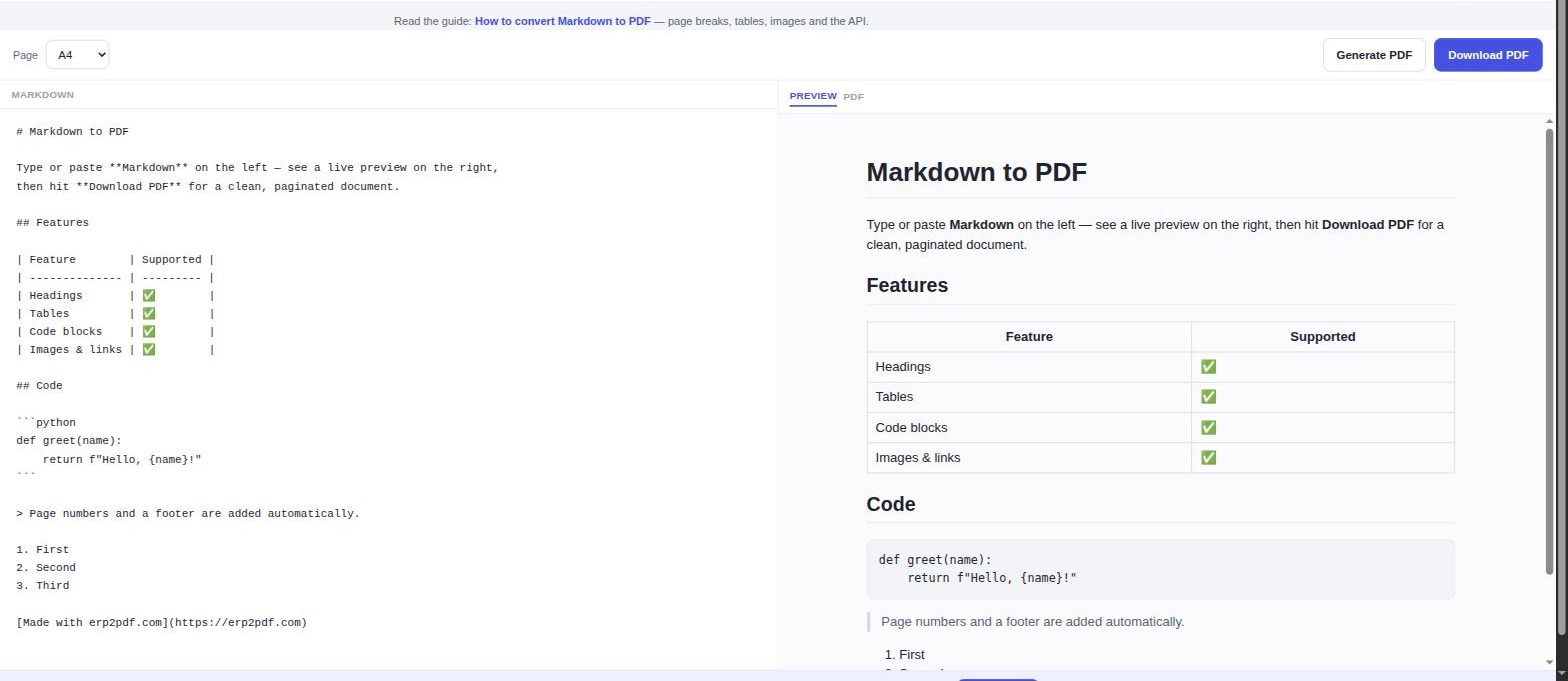
Anonymous use is one PDF every five minutes; a free account raises that to one per minute and unlocks the API the skill above needs.
Build the skill once and every report your agent writes can leave as a finished document.